
TL;DR: An n8n AI Agent earns its place only when the model must decide which action to take next. Wire it as a Tools Agent: one Chat Model (required), optional Simple or Postgres Memory, and one or more Tool sub-nodes, each with a description precise enough that the model knows when to call it. Write a system message that names the allowed actions and the exact final-answer format, and cap Max Iterations at your longest real tool chain plus two. If your task is a fixed sequence with no runtime choice, skip the agent and use a Basic LLM Chain. Grab the working demo below and change three fields.
The default agent type in current n8n is the Tools Agent, and it is the one to build on. It uses the model's native tool-calling instead of parsing tool requests out of free text, which is what makes it reliable across OpenAI, Anthropic, Gemini and the rest. Older types (Conversational, ReAct, OpenAI Functions) still show up in tutorials written against old versions. Ignore them for new builds.
Download and import the reference workflow, then read the sections below to understand what each wire does: Copy the workflow JSON below and paste it onto your n8n canvas (Ctrl/Cmd+V) to import it:
{
"name": "demo-ai-agent",
"nodes": [
{
"parameters": {
"options": {}
},
"id": "a1b2c3d4-0001-4a11-9a01-000000000001",
"name": "When chat message received",
"type": "@n8n/n8n-nodes-langchain.chatTrigger",
"typeVersion": 1.1,
"position": [
260,
340
],
"webhookId": "demo-ai-agent-chat"
},
{
"parameters": {
"options": {
"systemMessage": "You are a support triage agent for an n8n user. For each incoming message, decide exactly one action: RESOLVE (answer directly from what you know), LOOKUP (call the get_order_status tool, but only when the message references an order number or asks about order/shipping status), or ESCALATE (route to a human when the request is out of scope or ambiguous).\n\nRules:\n- Call get_order_status at most once per message, and only when an order id is present or clearly implied.\n- Do not invent order data. If the tool returns nothing useful, ESCALATE.\n- Keep reasoning to two sentences.\n- End every reply with a single final line in the form: ACTION: <RESOLVE|LOOKUP|ESCALATE>",
"maxIterations": 6,
"returnIntermediateSteps": false
}
},
"id": "a1b2c3d4-0002-4a11-9a01-000000000002",
"name": "AI Agent",
"type": "@n8n/n8n-nodes-langchain.agent",
"typeVersion": 1.9,
"position": [
620,
340
]
},
{
"parameters": {
"model": {
"__rl": true,
"value": "gpt-4o-mini",
"mode": "list",
"cachedResultName": "gpt-4o-mini"
},
"options": {}
},
"id": "a1b2c3d4-0003-4a11-9a01-000000000003",
"name": "OpenAI Chat Model",
"type": "@n8n/n8n-nodes-langchain.lmChatOpenAi",
"typeVersion": 1.2,
"position": [
460,
580
],
"credentials": {
"openAiApi": {
"id": "REPLACE_WITH_YOUR_CREDENTIAL_ID",
"name": "OpenAI account"
}
}
},
{
"parameters": {
"sessionIdType": "customKey",
"sessionKey": "={{ $json.sessionId }}",
"contextWindowLength": 10
},
"id": "a1b2c3d4-0004-4a11-9a01-000000000004",
"name": "Simple Memory",
"type": "@n8n/n8n-nodes-langchain.memoryBufferWindow",
"typeVersion": 1.3,
"position": [
640,
580
]
},
{
"parameters": {
"toolDescription": "Look up the current status of a customer order by its order id. Returns the order status, carrier, and estimated delivery date. Call this only when the user provides or clearly implies an order id.",
"method": "GET",
"url": "=https://demo.n8nlogic.com/api/orders/{{ $fromAI('order_id', 'The order id to look up, for example 10432', 'string') }}",
"options": {}
},
"id": "a1b2c3d4-0005-4a11-9a01-000000000005",
"name": "get_order_status",
"type": "@n8n/n8n-nodes-langchain.toolHttpRequest",
"typeVersion": 1.1,
"position": [
820,
580
]
}
],
"connections": {
"When chat message received": {
"main": [
[
{
"node": "AI Agent",
"type": "main",
"index": 0
}
]
]
},
"OpenAI Chat Model": {
"ai_languageModel": [
[
{
"node": "AI Agent",
"type": "ai_languageModel",
"index": 0
}
]
]
},
"Simple Memory": {
"ai_memory": [
[
{
"node": "AI Agent",
"type": "ai_memory",
"index": 0
}
]
]
},
"get_order_status": {
"ai_tool": [
[
{
"node": "AI Agent",
"type": "ai_tool",
"index": 0
}
]
]
}
},
"settings": {
"executionOrder": "v1"
},
"pinData": {},
"meta": {
"templateCredsSetupCompleted": false
}
}
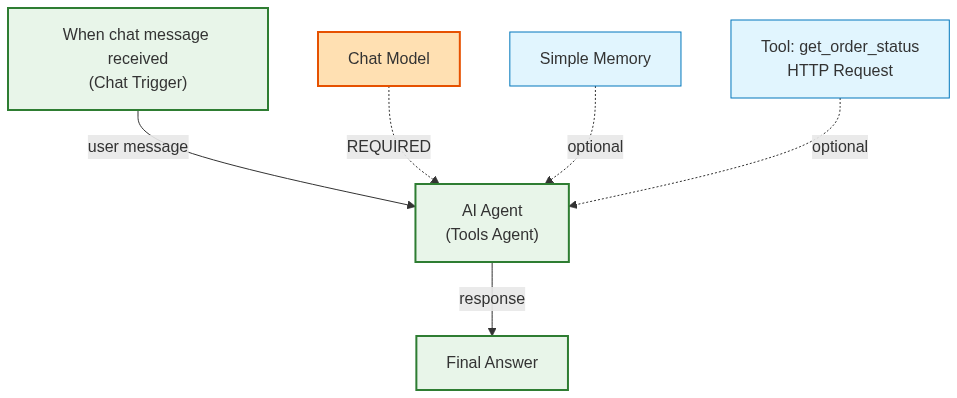
When is an n8n AI Agent the right choice, and when is it the wrong one?
Use an AI Agent only when the model must choose which action to take based on intermediate results. Use a Basic LLM Chain when the steps are fixed. The chain calls the model once and is cheap and predictable. The agent loops, picking and calling tools until it decides it is done, which is powerful for genuinely multi-step work and wasteful for a single decision.
The tell is whether the path branches at runtime. "Classify this email into one of three buckets" has one path: prompt in, label out. That is a chain. "Answer this support ticket, and look up the customer's order only if they mention one" branches on what the model finds, so the model needs to choose. That is an agent. If you can draw the steps as a straight line before the run, you do not need an agent, and adding one just buys you nondeterminism and token cost you did not want.
How do you wire the Chat Model, Memory and Tools onto the agent?
The AI Agent node has three connection points along its bottom edge, and they are not equal. The Chat Model is required and takes exactly one model. Memory is optional and makes the agent remember earlier turns. Tools are optional and repeatable, and they are the only thing that lets the agent act. Each connects as a sub-node, not an upstream main input.
Chat Model (required)
Connect exactly one chat model that supports tool calling. In practice that means a recent chat model, not an old completion model. If you connect a model that cannot call tools and wire tools up anyway, the agent simply will not use them. Pick for the job: a capable mid-tier model handles most routing and summarization agents, and you reserve the expensive reasoning models for agents that chain many tools or do hard logic. The model is also where your token cost lives, so a chatty agent on a premium model with Max Iterations set high is exactly how you get a surprise bill.
Memory (optional)
Add Memory only when the agent should remember across turns. Skip it for one-shot jobs like processing a row or answering a single webhook, where every execution should be stateless. Add it for chatbots. Use Simple Memory for a single-instance prototype, and Postgres or Redis chat memory the moment the agent runs on more than one worker or must survive a restart, because Simple Memory lives inside one process and vanishes with it.
Memory is keyed by a session ID, and this is where it bites. If every execution uses the same key, all your users share one conversation. If the key is unique per execution when it should be per user, nobody remembers anything. In the demo workflow the key is set to ={{ $json.sessionId }} so each chat session stays separate. Set it deliberately: usually a user id or chat id.
Tool (optional, repeatable)
Tools are what the agent can do: an HTTP Request tool, a Code tool, a sub-workflow, a vector store retriever, Gmail, a Calculator. Each has a name and a description, and the description is not decoration. It is the only thing the model reads to decide whether to call that tool. "Does stuff with data" gets the tool ignored or misused. "Look up a customer's order status by order id; returns status, carrier, and estimated delivery" gets it called at the right moment.
Two rules that save you later. Fewer good tools beat many overlapping ones, because if two tools could plausibly answer the same request the model will sometimes pick the wrong one. And for HTTP and sub-workflow tools, let the model fill parameters at runtime with the $fromAI() expression rather than hardcoding them. The demo's tool URL uses $fromAI('order_id', 'The order id to look up', 'string') so the agent supplies the order id it parsed from the user. If you are building tools as reusable sub-workflows across several agents, the skill files approach is worth setting up early instead of copy-pasting node configs.
What system message makes an agent decide instead of loop?
A system message that names the allowed actions and dictates the exact final-answer format. That single line telling the agent how to end does more to stop runaway loops than any iteration cap, because the model knows when it is finished. A vague system message is the number one cause of agents that loop pointlessly or call the wrong tool.
Be directive. The demo agent runs on this:
You are a support triage agent. For each incoming message, decide exactly one
action: RESOLVE (answer directly), LOOKUP (call get_order_status, but only when
the message references an order number or asks about order status), or ESCALATE
(route to a human when the request is out of scope or ambiguous).

Rules:

- Call get_order_status at most once per message, and only when an order id is present.

- Do not invent order data. If the tool returns nothing useful, ESCALATE.

- Keep reasoning to two sentences.

- End every reply with a single line in the form: ACTION: <RESOLVE|LOOKUP|ESCALATE>
Notice what the message does. It enumerates the exact actions, it gates the tool ("only when an order id is present"), it forbids fabrication, and it pins the ending. That last line is the load-bearing one.
Which agent parameters actually change behavior?
Four settings do the real work: Source for Prompt, System Message, Max Iterations, and Require Specific Output Format. The rest of the Options accordion changes how you watch the agent, not what it does.
Source for Prompt (User Message) has two choices. Use Connected Chat Trigger Node when the agent sits behind the Chat Trigger and the user's message flows in automatically, which is how the demo is wired. Use Define below for webhook, scheduled, or row-processing agents, where you write the prompt yourself and pull data with expressions. The most common confusion is leaving it on the trigger setting in a non-chat workflow and wondering why the prompt is empty.
Max Iterations caps the reason-and-act loops before the agent stops, and the default is 10. Each iteration is roughly one round of think, optionally call a tool, read the result. Size it to your longest real tool chain plus two, not a big round number. A two-tool agent does not need 25 iterations; that just lets a confused agent burn tokens. The demo sets it to 6. When the cap is hit the agent returns "Agent stopped due to max iterations", and there is a sharp edge worth testing: with the node's error handling on "Continue (using error output)", a max-iterations stop can route to the success output rather than the error output. Do not assume it lands in your error branch.
Require Specific Output Format is off by default and returns free text. Turn it on only when a downstream Set, IF, or Code node reads specific fields, then connect a Structured Output Parser sub-node with your schema, or an auto-fixing parser for inputs where the model occasionally mangles the format. Leave it off when the agent's job is a human-readable reply.
Return Intermediate Steps is your debugger. On, the output includes every tool call and its result. Turn it on while building to see why the agent picked a tool or got stuck, and off in production, where the steps just bloat the payload.
What breaks n8n agents most often?
The same handful of mistakes account for most broken agents, and none of them are exotic. In rough order of how often they show up:
-
Tool descriptions too vague for the model to select correctly. Rewrite them action-first.
-
Prompt source left on the Chat Trigger setting in a non-chat workflow, so the prompt is empty.
-
A shared memory session key leaking one user's history into another's.
-
Max Iterations set so high a confused agent loops expensively instead of failing fast.
-
Expecting a max-iterations stop to hit the error output when "Continue (using error output)" can send it to the success path.
One architectural note beyond the bugs: if you find yourself giving a single agent a dozen tools and a sprawling system message, that is the signal to split the work. Push knowledge into a retrieval-augmented setup where a vector store handles lookups, reach for the MCP client when the tools live in an external server, and lean on the broader agentic workflow patterns when one agent clearly wants to become several. A few tools an agent uses well always beats a toolbox it navigates badly.
FAQ
What is the difference between the AI Agent node and the Basic LLM Chain node?
The LLM Chain calls the model once and returns the result, so it is predictable and cheap. The Agent loops, choosing and calling tools based on intermediate results until it finishes or hits Max Iterations. Use the chain for single-shot tasks like classification or rewriting; use the agent when the model must decide which actions to take.
Which agent type should I use in n8n?
The Tools Agent. It uses the model's native tool-calling and is the current default, replacing older types like Conversational, ReAct, and OpenAI Functions. Only deviate for a specific reason, such as a model without native tool-calling support.
Why isn't my agent using the tools I connected?
Three usual causes: the chat model does not support tool-calling, the tool descriptions are too vague for the model to know when to call them, or the system message never tells the agent when each tool applies. Turn on Return Intermediate Steps to see what the agent is actually deciding.
Do I need to add a Memory sub-node?
Only if the agent should remember across turns. Skip it for one-shot tasks. For chatbots, add chat memory: Simple Memory for a single-instance prototype, Postgres or Redis for anything persistent or multi-worker. Set the session key per user or chat, not globally.
What is the default Max Iterations and what happens when it is hit?
The default is 10. When the agent reaches the cap it stops and returns "Agent stopped due to max iterations". Note that with the node's error setting on "Continue (using error output)", a max-iterations stop can route to the success output rather than the error output, so test that branch.
How do I get clean JSON out of the agent for the next node?
Turn on Require Specific Output Format and connect a Structured Output Parser sub-node with your schema. For inputs where the model occasionally returns malformed output, use the auto-fixing parser, which re-prompts the model to correct the format. Leave the toggle off when you only need a human-readable reply.
If you are wiring up your first production agent and want a second set of eyes on the system message, tool descriptions, and iteration limits before it goes live, that review is the cheapest insurance you can buy. Reach out and we are happy to look.
