
TL;DR: If you run under ~10,000 executions a month and nobody on your team is comfortable with Docker, stay on n8n Cloud - the Starter (EUR 20/mo) or Pro (EUR 50/mo) plan is cheaper once you price your own time. Self-host the moment you have a hard data-residency rule, need to reach a private network, or cross into tens of thousands of executions, where a $6-48/mo VPS with no execution limits wins decisively. The break-even is not a price - it is whether you will own updates, backups, and monitoring.
What does n8n actually cost?
n8n Cloud starts at EUR 20/mo (Starter, 2,500 executions) and EUR 50/mo (Pro, 10,000 executions). Self-hosting the Community edition has no licence fee and no execution cap: you pay for a VPS, roughly $6-12/mo entry or $24-48/mo for production, plus your own maintenance time. That last item is the one nobody quotes, and it is usually the largest.
Work out your own number with the n8n cost calculator, which prices the maintenance hours alongside the box.
Which should I choose: n8n Cloud or self-hosted?
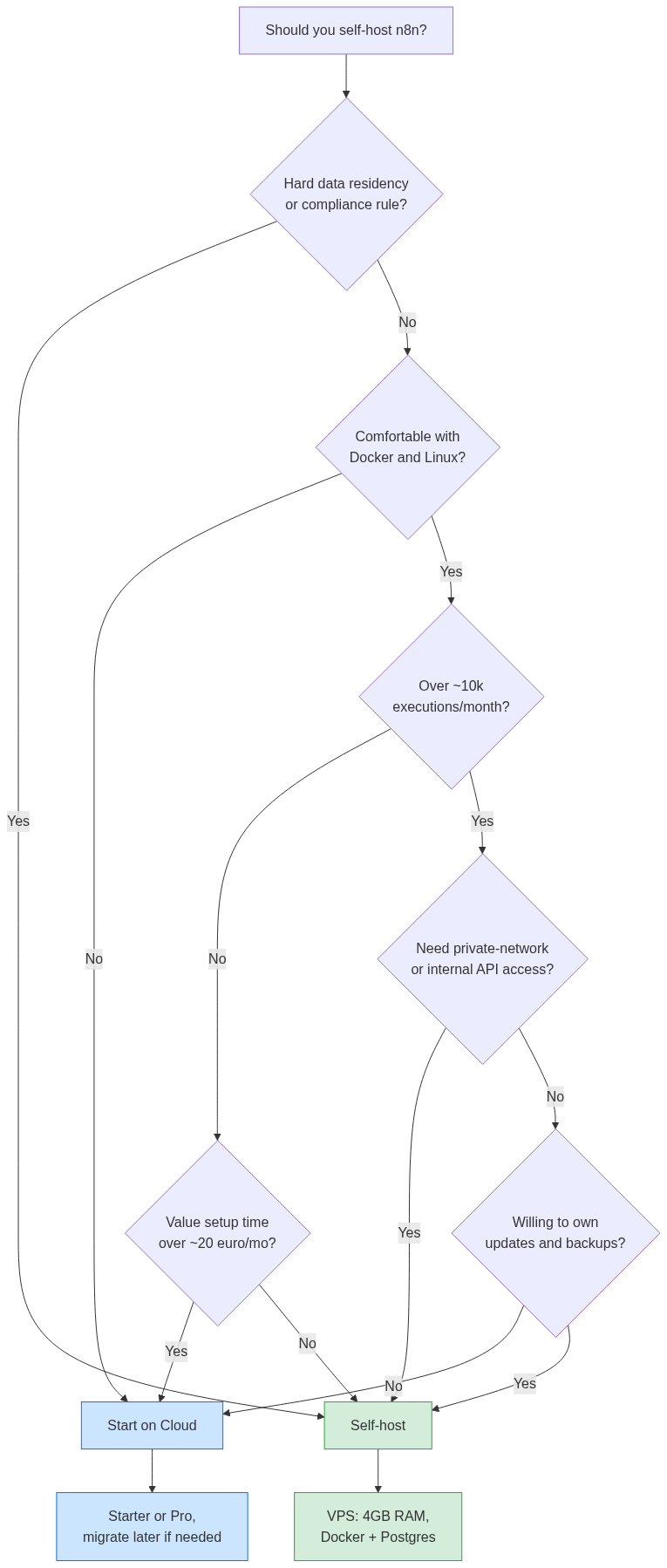
Pick n8n Cloud if your volume is low-to-moderate and you would rather build workflows than run a server. Pick self-hosted if you have a compliance rule, need private-network access, or run high volume where Cloud's per-execution tiers get expensive. The deciding variable is execution count crossed with whether anyone will maintain a Linux box.
Everything downstream of that question is detail. Cloud and self-hosted give you the identical editor, the identical node catalog, and portable workflow JSON. You are not choosing a product - you are choosing who runs the infrastructure and who eats the maintenance.
What does n8n Cloud actually cost in 2026?
n8n Cloud is priced in euros by execution volume, and as of April 2026 every plan includes unlimited active workflows and unlimited users. Starter is EUR 20/mo for 2,500 executions, Pro is EUR 50/mo for 10,000, and Business is EUR 667/mo for 40,000. Annual billing runs about 17% cheaper; monthly-billed USD lands near $24 and $60.
The number that decides your bill is executions, not workflows. One execution is one full workflow run, so a schedule that fires every 5 minutes burns roughly 8,640 executions a month on its own - most of a Pro plan before you have built anything else. Sub-workflows and retries count too. Price the plan against your real trigger frequency, not your workflow count. Source: n8n.io/pricing.
What does self-hosting n8n actually cost?
Self-hosting cost is your VPS plus your time - the n8n Community Edition itself is free with no execution limits and no active-workflow cap. A DigitalOcean droplet runs $6/mo (1GB), $12/mo (2GB), $24/mo (4GB/2vCPU), or $48/mo (8GB/4vCPU). Hetzner is cheaper for EU data residency, around EUR 8.49/mo for a 4vCPU/8GB box.
RAM is the bottleneck, not CPU. n8n's own minimum is 1 vCPU and 2GB, but 2GB fills fast: a Code node duplicates a large JSON payload in memory, and a few parallel runs blow past it. The practical sweet spot for production is 4-8GB, which is the $24-48/mo DigitalOcean tier or the Hetzner equivalent. Sources: DigitalOcean droplet pricing, Cherry Servers requirements guide.
The line every VPS-math comparison skips is time. Budget a few hours for the first Docker + Postgres + reverse-proxy build, then roughly an hour a month for image updates and disk monitoring. If that hour is worth more to you than the gap between a $12 VPS and a EUR 20 Cloud plan, the "cheaper" option is not cheaper.
n8n Cloud vs self-hosted: the comparison table
Cloud wins on effort and time-to-first-workflow; self-hosted wins on ceiling, control, and cost-at-scale. The table below uses the real 2026 figures - Cloud tiers from n8n.io, VPS tiers from DigitalOcean - so you can line up your own volume against a concrete monthly number.
| Dimension | n8n Cloud | Self-hosted (Docker) |
|---|---|---|
| Entry cost | EUR 20/mo Starter (2,500 exec) | $6-12/mo VPS (1-2GB) |
| Production cost | EUR 50/mo Pro (10,000 exec) | $24-48/mo VPS (4-8GB) |
| Execution limit | Capped per tier; overage = higher plan | None (hardware-bound only) |
| Active workflows / users | Unlimited (all plans, since Apr 2026) | Unlimited |
| Setup effort | Sign up, build in minutes | ~2-4 hrs first build |
| Ongoing maintenance | Zero (n8n manages it) | ~1 hr/mo updates + backups |
| Updates | Automatic, latest stable | You pull images; you pin versions |
| Data residency | n8n's servers/regions | Fully yours (HIPAA, strict GDPR) |
| Private-network access | Limited | Full (internal DBs, VPN, allowlists) |
| Scaling path | Move up a tier | Queue mode + Redis 6+, add workers |
When should you NOT self-host n8n?
Do not self-host if no one will own it. The failure mode we see repeatedly is a $12 VPS set up in an afternoon, then an unpatched, unmonitored box six months later with a full disk and a stale n8n version. If there is no Docker-comfortable person and no plan for backups and updates, Cloud is not the expensive option - it is the responsible one.
Also skip self-hosting when your volume is genuinely low. Under a few thousand executions a month, Starter at EUR 20 costs less than the time you would spend maintaining a server, and you get automatic updates and support for free. The reasons founders regret self-hosting are almost always the ones they discounted up front - we cover that pattern in when self-hosting n8n makes sense and when it does not.
When does self-hosting clearly win?
Self-host when a rule or a scale number forces it. Three triggers make the decision for you: a hard data-residency or compliance requirement (data cannot leave your infrastructure), workflows that must reach a private network or internal API, or high volume where Cloud's per-execution tiers stack up faster than a fixed VPS bill.
At tens of thousands of executions a month, the math is not close. A $48/mo 8GB VPS with no execution ceiling handles workloads that would sit in Business territory on Cloud. The tradeoff is that you now run infrastructure: Docker and Postgres, an Nginx reverse proxy with SSL, and eventually queue mode with Redis workers once a single instance stops keeping up. Redis 6+ and separate worker containers are the documented scaling path.
How do I migrate from Cloud to self-hosted later?
Start on Cloud, validate, then export and move - workflows are portable JSON, so migration is low-risk. Export your workflows from Cloud, stand up a Docker + Postgres instance, import the JSON, and re-enter credentials by hand (they never export, for security). Webhook URLs change with the new domain, so update those too.
This Cloud-first, self-host-later path is the default recommendation for most teams: you avoid paying the setup tax before you know n8n fits, and you only take on maintenance once volume or compliance actually justifies it. Going the other direction works identically - export, import, re-enter credentials.
If migrating or scaling a self-hosted instance is turning into more work than it is worth, that is the point where bringing in help pays off; see what to look for in an n8n expert and what to expect to pay.
FAQ
Is self-hosted n8n really free?
The n8n Community Edition is free and has no execution or active-workflow limits. You only pay for the server it runs on and your own maintenance time. Advanced features like SSO/SAML and Git-based version control sit behind the paid self-hosted Enterprise tier.
How many executions does n8n Cloud include per plan?
Starter includes 2,500 executions/month (EUR 20), Pro includes 10,000 (EUR 50), and Business includes 40,000 (EUR 667). One execution is one full workflow run, so frequent schedules and sub-workflows consume the allowance faster than people expect.
What VPS size do I need to self-host n8n?
n8n's minimum is 1 vCPU and 2GB RAM, but 2GB fills quickly because a single Code node can duplicate a large payload in memory. For production, 4-8GB is the sweet spot - roughly a $24-48/mo DigitalOcean droplet or a cheaper Hetzner equivalent.
When is n8n Cloud cheaper than self-hosting?
At low-to-moderate volume, once you price your own time. Under a few thousand executions a month, the EUR 20 Starter plan usually costs less than the maintenance hours a VPS demands, and you get automatic updates and support included.
Can I switch from Cloud to self-hosted without rebuilding workflows?
Yes. Workflows export as portable JSON and import straight into a self-hosted instance. The only manual steps are re-entering credentials, which never export for security, and updating webhook URLs to match your new domain.
Does self-hosting give me features Cloud does not?
Self-hosting gives you no execution limits, full data sovereignty, private-network access, and control over Postgres version, memory limits, and every environment variable. Cloud gives you managed infrastructure and automatic updates in exchange for that control.
If you want the self-hosted route without owning the maintenance, n8n Logic builds and runs production n8n stacks - Docker, Postgres, reverse proxy, and queue mode - so you get the cost ceiling of self-hosting without the 3am disk-full page.
