
TL;DR: The "connection lost" banner means your browser lost the WebSocket to n8n's /rest/push endpoint. The single most common cause is a reverse proxy that does not forward the WebSocket upgrade - fix it by adding proxy_http_version 1.1, Upgrade, and Connection "upgrade" to your nginx block. If the handshake instead returns Invalid origin!, that is the newer n8n >= 1.87.0 origin check and needs a forced Origin header. Open DevTools, watch the WS request, and the exact cause is obvious in 30 seconds.
What does "connection lost" in n8n actually mean?
It means the editor's WebSocket to the backend at /rest/push failed or dropped. n8n uses that persistent connection to push execution status and node output into the UI in real time. When it cannot open or stay open, the editor shows the banner and stops updating. The workflow engine itself usually keeps running - this is a transport problem between browser and server, not a broken instance.
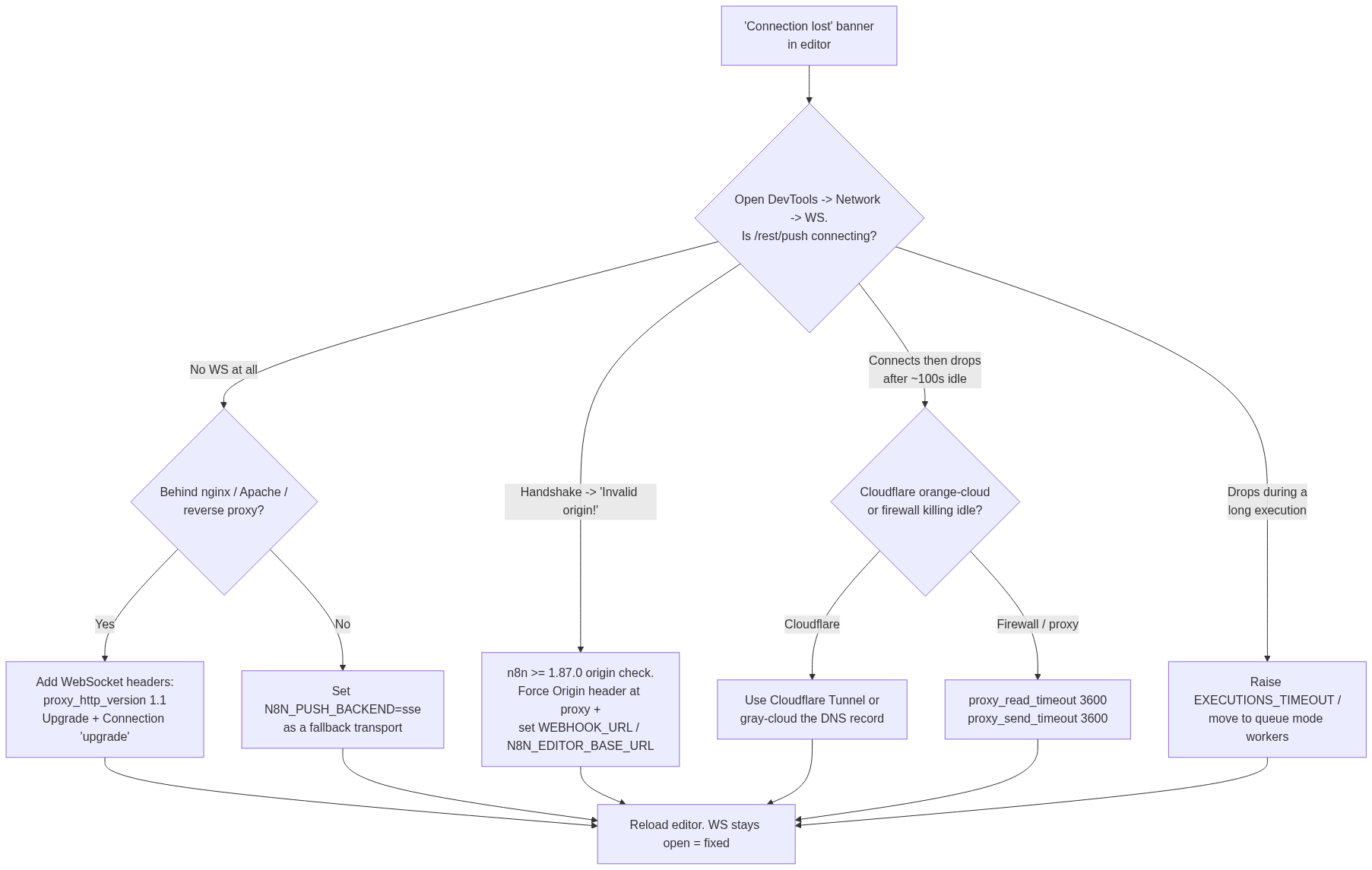
Before touching any config, diagnose it. Open browser DevTools, go to the Network tab, filter by WS, and reload the editor. You are looking for a request to wss://your-domain/rest/push?.... Its status tells you which of the six causes below applies:
-
No WS request or it fails immediately -> proxy is not forwarding the upgrade (Cause 1 or 2).
-
Handshake returns
Invalid origin!-> the n8n >= 1.87.0 origin check (Cause 3). -
Connects, then drops after ~100 seconds idle -> Cloudflare or firewall timeout (Cause 4 or 5).
-
Drops only during a long workflow run -> execution timeout (Cause 6).
Causes and fixes at a glance
The table maps the symptom you see in DevTools to the likely cause and the specific fix. The rest of the article expands each row into a copy-pasteable config.
| Symptom in DevTools / editor | Likely cause | The fix |
|---|---|---|
No /rest/push WS, or it fails instantly, behind nginx/Apache | Proxy not forwarding WebSocket upgrade | Add proxy_http_version 1.1 + Upgrade/Connection "upgrade" headers |
| WS fails and you are on a proxy that blocks WebSockets | Wrong push transport for your proxy | Set N8N_PUSH_BACKEND=sse |
Handshake rejected with Invalid origin! (n8n >= 1.87.0) | Strict origin check; proxy strips/rewrites Origin | Force Origin header at the proxy + set WEBHOOK_URL / N8N_EDITOR_BASE_URL |
| Connects, then drops after ~100s of idle | Cloudflare proxy timeout | Use Cloudflare Tunnel or gray-cloud the DNS record |
| Connects, drops after idle on a firewalled network | Firewall/proxy killing idle connections | Raise proxy_read_timeout / proxy_send_timeout to 3600 |
| Drops mid-run on a long workflow | Execution exceeds a timeout | Raise EXECUTIONS_TIMEOUT or move to queue mode |
Cause 1: your reverse proxy is not forwarding the WebSocket upgrade
This is the single most common cause. A default nginx or Apache config proxies normal HTTP fine but silently drops the WebSocket upgrade handshake, so /rest/push never connects. Multiple community threads resolve the exact same way: add the WebSocket headers to the n8n location block.
For nginx, the load-bearing lines are proxy_http_version 1.1, Upgrade, and Connection "upgrade". Without all three, the connection fails silently:
location / {
    proxy_pass http://127.0.0.1:5678;

    # WebSocket support - these three lines are the fix
    proxy_http_version 1.1;
    proxy_set_header Upgrade $http_upgrade;
    proxy_set_header Connection "upgrade";

    # Forward the real client so origin/host checks pass
    proxy_set_header Host $host;
    proxy_set_header X-Real-IP $remote_addr;
    proxy_set_header X-Forwarded-For $proxy_add_x_forwarded_for;
    proxy_set_header X-Forwarded-Proto $scheme;
}
Watch for a stale proxy_set_header Connection ''; line elsewhere in your config - it conflicts with the upgrade and must go. For Apache, enable mod_proxy_wstunnel and add a rewrite that proxies the upgrade to the WebSocket backend:
RewriteEngine On
RewriteCond %{HTTP:Upgrade} =websocket [NC]
RewriteRule /(.*) ws://127.0.0.1:5678/$1 [P,L]
If your proxy is the culprit, the WS request goes from failing to a persistent open connection the instant you reload. See the full nginx reverse proxy and SSL setup for the complete server block.
Cause 2: the wrong push backend for your proxy
Since n8n 1.0, N8N_PUSH_BACKEND defaults to websocket. Some proxies, corporate content-inspection appliances, and CDNs mangle or block WebSockets entirely, so the default never connects. Switching to Server-Sent Events, which ride ordinary HTTP, sidesteps the whole class of problem.
Set it in your environment or docker-compose.yml:
environment:
  - N8N_PUSH_BACKEND=sse
This is the pragmatic fallback when you cannot change the network layer. SSE is one-directional and slightly less efficient than WebSocket, so prefer fixing the proxy (Cause 1) when you control it, and reach for sse when you do not. For the full list of related settings, see the n8n environment variables reference.
Cause 3: "Invalid origin!" after upgrading to n8n 1.87.0 or later
If the handshake is rejected with Invalid origin! and it started after an upgrade, this is the origin check n8n added in 1.87.0. n8n validates the Origin header on /rest/push, and many load balancers, tunnels, and CDNs strip it or send it without the scheme (n8n.example.com instead of https://n8n.example.com), so the check fails and the editor shows connection lost.
The fix has two parts. First, tell n8n its real public URL so it knows the origin to expect:
environment:
  - N8N_HOST=n8n.example.com
  - N8N_PROTOCOL=https
  - N8N_EDITOR_BASE_URL=https://n8n.example.com
  - WEBHOOK_URL=https://n8n.example.com
  - N8N_PROXY_HOPS=1   # number of proxies in front of n8n
Second, force the correct Origin at the proxy so it arrives intact. In nginx: proxy_set_header Origin "https://n8n.example.com";. Behind a Cloudflare Tunnel, add a Transform Rule (Rules -> Transform Rules -> Modify Request Header) that sets a static Origin header of https://n8n.example.com for your hostname. This is the accepted community fix for the Cloudflare Tunnel case. N8N_PROXY_HOPS matters here too: set it to the number of proxy layers (Cloudflare + nginx = 2) so n8n reads client headers correctly.
Cause 4: Cloudflare drops the connection after ~100 seconds
If the WebSocket connects and then dies after roughly 100 seconds of an idle editor, Cloudflare's proxy timeout is closing it. The orange-cloud proxy enforces a connection timeout that kills idle WebSocket and long-poll connections, and an open-but-quiet editor tab hits it repeatedly.
Pick one:
-
Cloudflare Tunnel - run
cloudflaredand route n8n through the tunnel, which handles the persistent connection instead of the timed-out edge proxy. -
Gray-cloud the DNS record - switch the n8n record to "DNS only" so traffic bypasses the Cloudflare proxy entirely. If you do this, put real security in front of the origin, since it is now directly reachable.
Tunnel is the better default because you keep Cloudflare in front for TLS and access control while getting a stable connection.
Cause 5: a firewall or proxy is killing idle connections
On corporate networks and behind conservative proxies, idle WebSocket connections get reaped by the network appliance long before n8n or the browser would drop them. The /rest/push connection is idle whenever no workflow is executing, so it is a prime target.
Raise the idle timeouts on your proxy so the connection outlives the quiet periods. For nginx:
location / {
    proxy_read_timeout 3600;
    proxy_send_timeout 3600;
    # ... plus the Cause 1 WebSocket headers
}
If a hardware firewall is doing the reaping and you cannot change its timeout, fall back to N8N_PUSH_BACKEND=sse (Cause 2) - SSE's plain-HTTP connection often survives inspection where a raw WebSocket does not.
Cause 6: the connection drops only during long-running workflows
If everything is stable until a specific heavy workflow runs, and the editor drops mid-execution, the run is being cut off rather than the transport failing on its own. Long executions can exceed a proxy read timeout or, if you set one, an n8n execution timeout - and when the request that carries the run is severed, the push connection goes with it.
Two levers. First, raise the proxy timeouts as in Cause 5 so a long request is not cut. Second, if you have set a workflow timeout, raise it - EXECUTIONS_TIMEOUT defaults to -1 (no limit), so a low value here is something you configured:
environment:
  - EXECUTIONS_TIMEOUT=3600      # seconds; -1 = no limit (default)
  - EXECUTIONS_TIMEOUT_MAX=7200
The real fix for heavy or frequent long runs is architectural: move to queue mode so executions run on dedicated worker processes and the editor is never holding a long connection open. See queue mode with Redis workers for the setup, and the Docker + Postgres foundation it builds on.
How do I confirm the connection is fixed?
Reload the editor with DevTools open on the Network tab filtered to WS. A healthy instance shows a single /rest/push request that connects and stays in the open (101 Switching Protocols) state without repeatedly reconnecting. Trigger a manual workflow run and confirm node output appears live in the canvas. If the WS opens and stays open, the banner is gone for good.
If you changed environment variables, restart the n8n container fully - some of these (N8N_PUSH_BACKEND, the URL and proxy-hop settings) are only read at startup, and a hot reload will not pick them up. This is a frequent false failure: the config is correct but the old process is still running.
FAQ
Why does n8n keep saying "connection lost" even though my workflows still run?
Because the workflow engine and the editor's live updates use different paths. Executions run server-side regardless, but the banner reflects the /rest/push WebSocket, which is purely for pushing UI updates. A broken WebSocket breaks the live view without stopping automation.
Is the connection lost error a WebSocket problem or something else?
Almost always WebSocket. The editor opens a persistent connection to /rest/push, and the banner appears when that connection cannot open or gets dropped. The exception is the Invalid origin! variant, which is n8n rejecting the handshake on purpose over a bad Origin header rather than a transport failure.
Should I use websocket or sse for N8N_PUSH_BACKEND?
Use the default websocket when you control the proxy and can forward the upgrade correctly - it is more efficient and bidirectional. Switch to sse only when a proxy, CDN, or firewall you cannot change is blocking WebSockets, since SSE rides ordinary HTTP.
Why did connection lost start right after upgrading n8n?
Most commonly the 1.87.0 origin check (Cause 3), which newly validates the Origin header on /rest/push and rejects requests from proxies that strip or rewrite it. Check DevTools for Invalid origin!. If instead you see a different version misbehaving, check the n8n GitHub issues for that release before rolling back.
Do I need N8N_PROXY_HOPS set?
Set it whenever n8n runs behind one or more reverse proxies; it defaults to 0. Give it the number of proxy layers in front of the instance (one nginx = 1, Cloudflare + nginx = 2) so n8n trusts the forwarded headers and reads the real client origin and IP.
Will increasing proxy_read_timeout hurt anything?
No meaningful downside for n8n. A higher proxy_read_timeout and proxy_send_timeout (3600 is common) just let the idle /rest/push connection survive quiet periods instead of being reaped, which is exactly what you want for a live editor.
Still stuck after checking all six? If you want the reverse proxy, environment, and queue-mode setup done correctly the first time, n8n Logic builds and hardens self-hosted n8n deployments so the editor connection stays solid under real load.
