
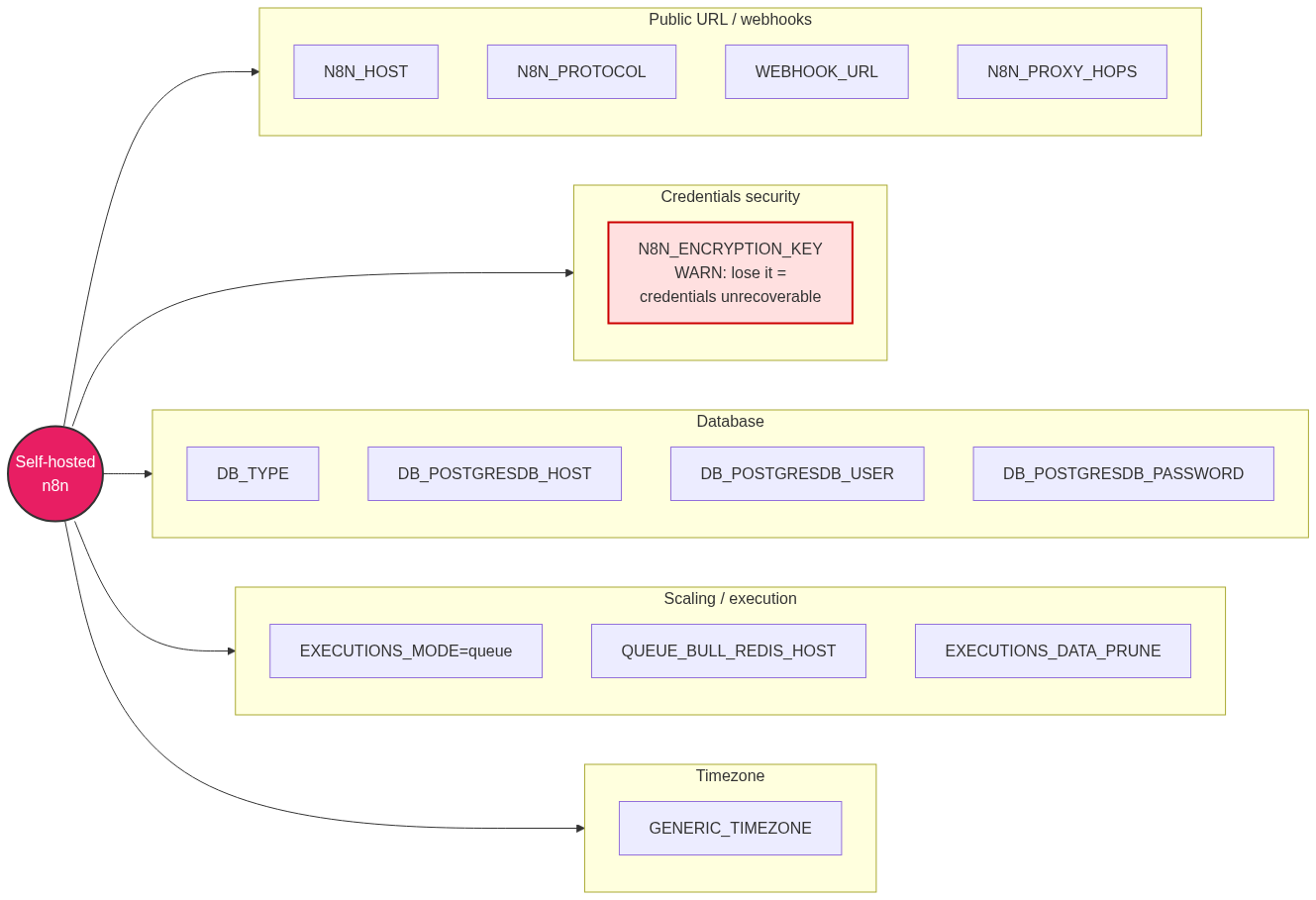
TL;DR: Out of ~100 documented n8n env vars, twelve decide whether your production self-host survives a restart, resolves webhook URLs correctly, and keeps its database from filling up. Set N8N_ENCRYPTION_KEY before your first boot or you will eventually lose every stored credential with no recovery path. If you run behind nginx or Traefik, the WEBHOOK_URL + N8N_PROXY_HOPS pair is not optional. Everything else has a sane default. The annotated production .env at the bottom is copy-pasteable.
The n8n docs list environment variables across deployment, endpoints, and database pages, most with defaults that are already correct for production. Chasing all of them is wasted effort. The set below is the shortlist that actually changes behavior on a self-hosted instance, front-loaded by how badly you get burned when you skip it.
Which n8n environment variable do you lose your credentials over?
N8N_ENCRYPTION_KEY. It encrypts every credential stored in the n8n database. If you never set it, n8n generates a random key on first launch and writes it to ~/.n8n/config. Lose that file or change the key later, and every saved credential becomes permanently undecryptable. There is no recovery mechanism.
This is the single most common cause of a self-host disaster. It happens when someone runs n8n in a container without a persistent volume for ~/.n8n, restarts, and the auto-generated key is gone. The workflows survive; the credentials inside them do not. Set the key explicitly before your first production boot:
N8N_ENCRYPTION_KEY=$(openssl rand -hex 32)
Store it in your secret manager, not in a committed .env. For containers, prefer N8N_ENCRYPTION_KEY_FILE=/run/secrets/n8n_key so the plaintext never lands in docker-compose.yml. The _FILE suffix works on nearly every n8n variable and always wins over the plain form.
How do you make webhook URLs work behind a reverse proxy?
Set WEBHOOK_URL and N8N_PROXY_HOPS together. n8n builds webhook and editor URLs by combining N8N_PROTOCOL, N8N_HOST, and N8N_PORT. Internally it listens on 5678, so without intervention every webhook URL it hands out contains localhost:5678, which no external service can reach.
Behind nginx, Traefik, or Caddy the proxy terminates SSL on 443 and forwards to 5678. Two variables fix the mismatch:
WEBHOOK_URL=https://n8n.example.com/
N8N_EDITOR_BASE_URL=https://n8n.example.com/
N8N_PROXY_HOPS=1
WEBHOOK_URL overrides the URL n8n registers with external services and shows in the editor. N8N_PROXY_HOPS defaults to 0; set it to the number of proxies in front of n8n (usually 1, or 2 behind a load balancer plus a proxy). Skip it and n8n either trusts the wrong client IP or throws ERR_ERL_UNEXPECTED_X_FORWARDED_FOR under rate-limiting. If webhooks silently never fire, this trio is the first thing to check.
What are the database variables for a Postgres self-host?
Five variables switch n8n off SQLite and onto Postgres, which you want for any real production instance. SQLite is the default (DB_TYPE=sqlite) and does not handle concurrent execution or queue mode well.
DB_TYPE=postgresdb
DB_POSTGRESDB_HOST=postgres
DB_POSTGRESDB_PORT=5432
DB_POSTGRESDB_DATABASE=n8n
DB_POSTGRESDB_USER=n8n
DB_POSTGRESDB_PASSWORD=your-db-password
The documented defaults are localhost, 5432, database n8n, user postgres, and an empty password. Switching DB_TYPE after workflows exist means a manual migration, so decide before your first boot, exactly like the encryption key. For SSL to a managed Postgres, add DB_POSTGRESDB_SSL_ENABLED=true; it auto-enables if you supply a CA, cert, or key path. Full walkthrough in n8n Docker + Postgres setup.
When do you need queue mode variables?
Only when one main process can no longer keep up, or when you want executions isolated from the UI process. EXECUTIONS_MODE defaults to regular, which runs everything in the main process. Set it to queue and n8n distributes executions to worker processes over Redis:
EXECUTIONS_MODE=queue
QUEUE_BULL_REDIS_HOST=redis
QUEUE_BULL_REDIS_PORT=6379
Redis defaults to localhost:6379. Queue mode is the single biggest scaling lever n8n has, but do not reach for it early. A single instance on Postgres handles far more than most people expect. Turn it on when execution latency climbs or a heavy workflow starves the UI, and add workers horizontally from there. The full worker-scaling setup is in n8n queue mode: scaling workers with Redis.
Which execution and housekeeping variables should you set?
Pruning is already on, but verify it. EXECUTIONS_DATA_PRUNE defaults to true and EXECUTIONS_DATA_MAX_AGE to 336 hours (14 days). On a busy instance the executions table is what fills your disk, so tune the age down if storage is tight:
EXECUTIONS_DATA_PRUNE=true
EXECUTIONS_DATA_MAX_AGE=168
GENERIC_TIMEZONE=Europe/Tallinn
GENERIC_TIMEZONE is the quiet one that bites schedule-heavy instances. It defaults to America/New_York, so every Schedule Trigger fires on New York time until you set it. If your cron nodes run "at the wrong hour," this is why. Set it to your actual timezone once and stop debugging phantom scheduling bugs.
The annotated production .env
Copy this, replace the placeholders, and you have a production-shaped n8n behind a reverse proxy on Postgres. Every value here is either a must-set or an intentional override of a default; anything not listed can stay at its documented default.
# --- CRITICAL: set before first boot, then never change ---
N8N_ENCRYPTION_KEY=your-32-char-key-from-openssl-rand-hex-32
DB_TYPE=postgresdb

# --- Database (Postgres) ---
DB_POSTGRESDB_HOST=postgres
DB_POSTGRESDB_PORT=5432
DB_POSTGRESDB_DATABASE=n8n
DB_POSTGRESDB_USER=n8n
DB_POSTGRESDB_PASSWORD=your-db-password

# --- Public URL / reverse proxy (nginx, Traefik, Caddy) ---
N8N_HOST=n8n.example.com
N8N_PORT=5678
N8N_PROTOCOL=https
WEBHOOK_URL=https://n8n.example.com/
N8N_EDITOR_BASE_URL=https://n8n.example.com/
N8N_PROXY_HOPS=1

# --- Housekeeping ---
EXECUTIONS_DATA_PRUNE=true
EXECUTIONS_DATA_MAX_AGE=168
GENERIC_TIMEZONE=Europe/Tallinn

# --- Scale only when a single instance stops keeping up ---
# EXECUTIONS_MODE=queue
# QUEUE_BULL_REDIS_HOST=redis
# QUEUE_BULL_REDIS_PORT=6379
Generate the key with openssl rand -hex 32. In production, feed secrets through the _FILE variants (N8N_ENCRYPTION_KEY_FILE, DB_POSTGRESDB_PASSWORD_FILE) pointed at Docker or Kubernetes secrets rather than inlining them here.
If your instance loads but the editor keeps dropping its connection after this change, that is usually the proxy dropping the WebSocket that N8N_PUSH_BACKEND (default websocket) relies on, not an env-var problem. See n8n connection lost error: causes and fixes. For the nginx and SSL config that pairs with the URL variables above, see n8n nginx reverse proxy with SSL.
FAQ
What happens if I change N8N_ENCRYPTION_KEY after storing credentials?
Every existing credential becomes permanently undecryptable. n8n cannot read them with a different key and there is no recovery path. You have to delete and re-create each credential by hand. Set the key once, before first boot, and back it up in a secret manager.
Do I need WEBHOOK_URL if I am not using a reverse proxy?
If n8n is directly reachable on its public host and port, set WEBHOOK_URL to that public address anyway. Otherwise n8n builds webhook URLs from N8N_HOST and N8N_PORT, which are often localhost:5678 and unreachable from outside.
What is the default for N8N_PROXY_HOPS?
0, meaning n8n trusts no proxy. Behind a single reverse proxy set it to 1; behind a load balancer plus a proxy set it to 2. Leaving it at 0 behind a proxy causes wrong client IPs and X-Forwarded-For rate-limit errors.
Why do my Schedule Trigger nodes fire at the wrong time?
GENERIC_TIMEZONE defaults to America/New_York. Schedule and Cron nodes use that timezone until you override it. Set GENERIC_TIMEZONE to your actual region (for example Europe/Tallinn) and restart.
Should I turn on EXECUTIONS_DATA_PRUNE?
It is already on by default, keeping 336 hours (14 days) of execution data. On a high-volume instance the executions table is usually what fills the disk, so lower EXECUTIONS_DATA_MAX_AGE rather than disabling pruning.
How do I keep secrets out of my .env file?
Use the _FILE suffix. Instead of N8N_ENCRYPTION_KEY=..., set N8N_ENCRYPTION_KEY_FILE=/run/secrets/n8n_key pointing at a mounted file. It works with Docker and Kubernetes secrets, and the file value always takes precedence over the plain variable.
Setting these twelve correctly is the difference between an n8n instance that survives its first restart and one that quietly loses its credentials at 3am. If you would rather have the deployment done right the first time, n8n Logic builds and hardens production n8n self-hosts end to end.
