
TL;DR: Put n8n behind Nginx with SSL by proxying :443 to n8n:5678 over HTTP/1.1, and set two things most guides drop: the websocket Upgrade/Connection header pair (via a map block) and WEBHOOK_URL plus N8N_PROXY_HOPS=1 in n8n's environment. Miss the header pair and the editor shows "connection lost." Miss the env vars and your webhooks register as http:// even on HTTPS. The working server block is below, copy-paste ready.
What is the one mistake that breaks n8n behind Nginx?
Leaving out the websocket upgrade headers. A plain proxy_pass to n8n returns the login page, loads the editor once, and passes a quick test, so people ship it. Then the editor's persistent websocket has nothing to upgrade through, and n8n reports "connection lost" while long executions silently fail. It is the single most common self-hosted n8n proxy bug.
The second half of the same mistake is skipping WEBHOOK_URL and N8N_PROXY_HOPS=1. Nginx terminates TLS, so the request reaches n8n as plain HTTP on port 5678. Without those settings n8n builds its public URLs from its own internal host and protocol and hands out http:// webhook addresses. Stripe and GitHub then call a URL that redirects or fails. Both halves work in testing and break in production, which is why they are so easy to miss.
The broken config vs the working config
Here is what most tutorials give you. It proxies to n8n and nothing more:
# BROKEN - no websocket upgrade, editor will drop
server {
    listen 443 ssl;
    server_name n8n.yourdomain.com;

    ssl_certificate     /etc/letsencrypt/live/n8n.yourdomain.com/fullchain.pem;
    ssl_certificate_key /etc/letsencrypt/live/n8n.yourdomain.com/privkey.pem;

    location / {
        proxy_pass       http://localhost:5678;
        proxy_set_header Host $host;
    }
}
It loads the UI, so it looks done. It is not: no proxy_http_version 1.1, no Upgrade/Connection headers, no X-Forwarded-Proto. The websocket cannot upgrade and n8n never learns the request arrived over HTTPS.
Here is the working config. The map block sits at the top level of nginx.conf (or in sites-available, outside any server block):
# WORKING - websocket upgrade + forwarded headers
map $http_upgrade $connection_upgrade {
    default upgrade;
    ''      close;
}

server {
    listen 80;
    server_name n8n.yourdomain.com;
    return 301 https://$host$request_uri;
}

server {
    listen 443 ssl;
    server_name n8n.yourdomain.com;

    ssl_certificate     /etc/letsencrypt/live/n8n.yourdomain.com/fullchain.pem;
    ssl_certificate_key /etc/letsencrypt/live/n8n.yourdomain.com/privkey.pem;
    include             /etc/letsencrypt/options-ssl-nginx.conf;
    ssl_dhparam         /etc/letsencrypt/ssl-dhparams.pem;

    add_header Strict-Transport-Security "max-age=31536000" always;
    add_header X-Frame-Options SAMEORIGIN;
    add_header X-Content-Type-Options nosniff;

    # Long-running workflows need generous timeouts
    proxy_read_timeout    300s;
    proxy_connect_timeout 75s;

    # File and large-payload workflows
    client_max_body_size 50m;

    location / {
        proxy_pass         http://localhost:5678;
        proxy_http_version 1.1;

        # The header pair everyone forgets
        proxy_set_header Upgrade    $http_upgrade;
        proxy_set_header Connection $connection_upgrade;

        # So n8n builds https:// URLs and knows the real host
        proxy_set_header Host              $host;
        proxy_set_header X-Real-IP         $remote_addr;
        proxy_set_header X-Forwarded-For   $proxy_add_x_forwarded_for;
        proxy_set_header X-Forwarded-Proto $scheme;
        proxy_set_header X-Forwarded-Host  $host;

        proxy_buffering off;
    }
}
This is the copy-paste artifact. If n8n runs in Docker on the same host, change proxy_pass to http://n8n:5678 (the compose service name); on a separate machine, use its internal IP, and open port 5678 to the Nginx host only.
Why does the Connection header need a map instead of a hardcoded value?
Because the Connection header must depend on whether the client actually asked to upgrade. Nginx's own websocket docs set map $http_upgrade $connection_upgrade so the value is upgrade when the request carries an Upgrade header and close otherwise. Hardcoding Connection "upgrade" on every request breaks normal HTTP responses.
That conditional is exactly what n8n needs. The editor opens a wss:// connection for live updates, while API calls and webhook payloads are ordinary HTTP. The map routes both correctly through one location block. Pair it with proxy_http_version 1.1, since HTTP/1.0 has no upgrade mechanism at all, and the editor stays connected instead of dropping after the first idle timeout. See our deeper writeup on the n8n connection lost error causes and fixes if the editor still disconnects after this.
How the request actually flows
The browser opens an HTTPS request to Nginx on :443. Nginx terminates TLS, then proxies to n8n on :5678 over HTTP/1.1, forwarding the Upgrade header so the editor websocket can establish a wss:// tunnel. On the way, Nginx sets X-Forwarded-Proto and X-Forwarded-Host, which n8n reads to build correct public URLs.
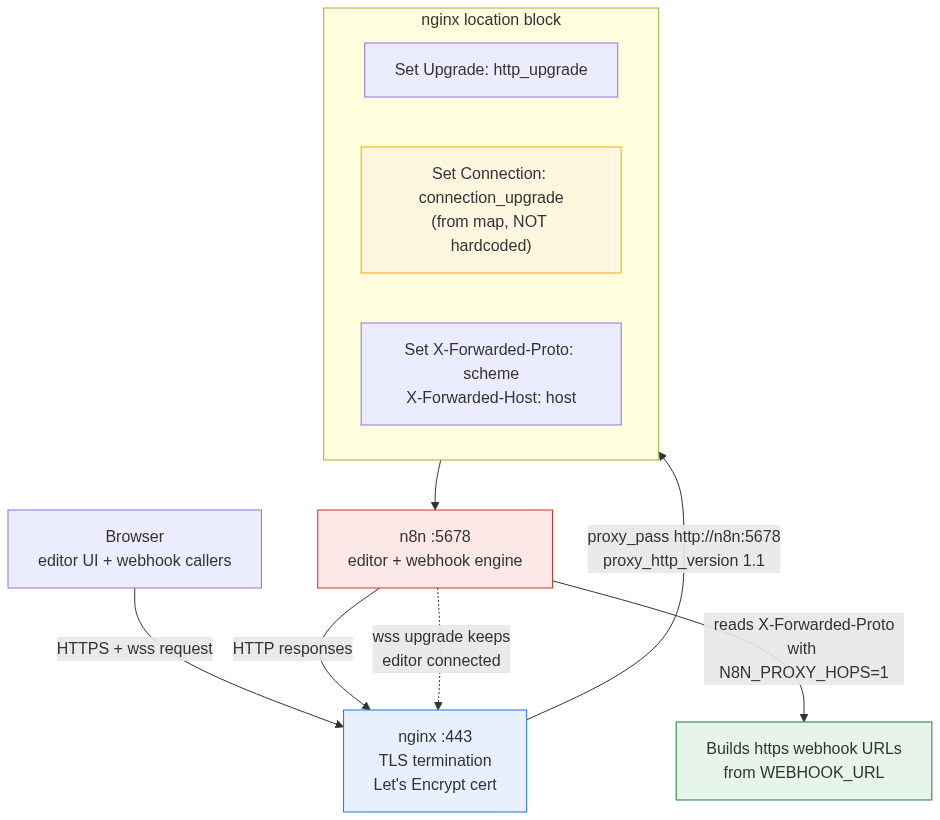
The single conditional worth internalizing: n8n only trusts those forwarded headers when you tell it how many proxies sit in front. That is what N8N_PROXY_HOPS does, and it is the env-side half of the fix.
What n8n environment variables do I set behind a proxy?
Set WEBHOOK_URL to your public HTTPS address and N8N_PROXY_HOPS=1. n8n's docs are explicit: it normally builds webhook URLs from N8N_PROTOCOL, N8N_HOST and N8N_PORT, which is wrong behind a proxy because it runs internally on 5678 while Nginx exposes 443. WEBHOOK_URL overrides that, and N8N_PROXY_HOPS=1 tells n8n to trust one layer of forwarded headers.
N8N_HOST=n8n.yourdomain.com
N8N_PROTOCOL=https
WEBHOOK_URL=https://n8n.yourdomain.com/
N8N_PROXY_HOPS=1
Set N8N_PROXY_HOPS to the real number of proxies in the chain: 1 for Nginx alone, 2 if a cloud load balancer or Cloudflare sits in front of Nginx. n8n ignores X-Forwarded-Proto and X-Forwarded-Host entirely unless this is set, so the Nginx headers above and this variable are a matched pair; one without the other does nothing. For the full list, see n8n environment variables: the complete reference. If you have not stood up the database yet, do the n8n Docker Postgres setup first, then apply this proxy on top.
Get the certificate with Certbot
Install Nginx and Certbot, then issue the cert before you enable the HTTPS block:
sudo apt update
sudo apt install -y nginx certbot python3-certbot-nginx
sudo certbot --nginx -d n8n.yourdomain.com
Certbot writes the certificate to /etc/letsencrypt/live/n8n.yourdomain.com/ and adds a renewal timer. Let it obtain the certificate, then paste the working server block above over whatever Certbot generated, so you keep full control of the proxy headers. Validate and reload:
sudo nginx -t
sudo systemctl reload nginx
nginx -t catches the usual failure: a missing map block referenced by $connection_upgrade, or an SSL server block pointing at a certificate that does not exist yet. Renewal is automatic; force a dry run with sudo certbot renew --dry-run.
Verify it in 90 seconds
Three checks confirm both halves of the fix. Skipping the third is how the websocket bug reaches production unnoticed.
- Open
https://n8n.yourdomain.comand confirm a valid padlock. TLS and the redirect work. - Add a Webhook trigger node. The displayed URL must start with
https://. If it showshttp://, yourWEBHOOK_URLorN8N_PROXY_HOPSis wrong, not your Nginx. - Open browser dev tools, Network tab, filter to WS, and reload the editor. You should see one live
wss://connection that stays open. If it flaps or closes, theUpgrade/Connectionpair is missing.
Check three is the one that separates a config that demos from a config that holds. When it stays open, you are done.
Should you use Nginx, or Caddy or Traefik instead?
Use Nginx when you want the most widely documented option and already know it; the config above is the whole job. Use Caddy if you have no proxy experience: it does automatic HTTPS and websockets with a one-line config and no map block to forget. Use Traefik when you run several services and want label-based routing.
All three terminate TLS and proxy the websocket correctly once configured. Nginx's only real downside here is that the websocket upgrade is manual, which is exactly the step this article exists to get right. If you are still deciding whether to self-host at all, weigh it against managed hosting in n8n cloud vs self-hosted.
FAQ
Why do my n8n webhooks show http:// instead of https://?
n8n built the URL from its internal protocol because it did not trust your proxy. Set WEBHOOK_URL=https://n8n.yourdomain.com/ and N8N_PROXY_HOPS=1, confirm Nginx sends X-Forwarded-Proto $scheme, and restart n8n. The three must all be present; any one alone will not fix it.
Why does the n8n editor say "connection lost" behind Nginx?
The websocket cannot upgrade through the proxy. Add the map $http_upgrade $connection_upgrade block, set proxy_http_version 1.1, and forward Upgrade $http_upgrade and Connection $connection_upgrade. Reload with nginx -t first to catch a missing map.
Do I need the map block, or can I hardcode Connection "upgrade"?
Use the map. Hardcoding Connection "upgrade" on every request breaks normal HTTP responses, because the header should only say upgrade when the client actually requested one. The map sets upgrade for websocket requests and close for the rest, which is what nginx's own docs recommend.
What should N8N_PROXY_HOPS be set to?
The number of proxies between the client and n8n. Use 1 for Nginx alone. Use 2 if Cloudflare or a cloud load balancer sits in front of Nginx, so n8n trusts both forwarded layers. Too low and it ignores the real client protocol; too high and it trusts spoofable headers.
Can I run n8n on a subdirectory like domain.com/n8n/?
Prefer a subdomain. n8n bakes assumptions about its base URL, and subdirectory setups need N8N_PATH and N8N_EDITOR_BASE_URL, which frequently conflict with webhook routing. A subdomain avoids the whole class of problems.
My n8n is on a different server from Nginx. What changes?
Only proxy_pass. Point it at the internal IP, for example http://10.0.0.5:5678, and make sure port 5678 is reachable from the Nginx host and firewalled from the public internet. Every header and env var stays the same.
Need this done for you?
If you are deploying n8n for a business and want a hardened, correctly proxied instance without debugging websocket headers, n8n Logic sets up and maintains self-hosted n8n for agencies and SMBs. We have shipped this proxy configuration many times and can have a production instance running on your infrastructure the same day.
