
TL;DR: Self-hosting n8n is the right call for exactly three profiles: teams with real DevOps capacity, teams that need custom npm nodes or data sovereignty, and teams past roughly 10,000 executions per day where the cost math flips. For everyone else, the "free" version is not free. You pay in updates, backup verification, 2am recovery, security patching, and one encryption key that can lock you out of every credential you own. Below is the true cost side by side, a decision flowchart, and an honest "when NOT to."
Is self-hosting n8n actually cheaper than n8n Cloud?
Only if your own time is worth close to zero, or you are at high execution volume. The VPS is cheap. What is not cheap is the maintenance labor stacked on top: OS patching, backup verification, version upgrades that can break workflows, and unplanned recovery. Below a few thousand executions a day, managed hosting usually wins on total cost once you price your hours honestly.
The n8n community says it directly: the free self-hosted version is not truly free, because you are still paying for hosting infrastructure, and those costs can approach cloud pricing. That is before you count a single hour of your own time.
The mistake is comparing a VPS line item against an n8n Cloud subscription. That is not the real comparison. The real comparison is total cost of ownership, and it includes the hours below.
What does self-hosting n8n really cost, in money and hours?
It costs a cheap server plus a recurring maintenance load that most founders never budget for: patching, backup checks, upgrades, and incident recovery. The table shows the honest picture. The dollar column is small. The hours and risk columns are where regret lives.
| Cost dimension | Self-hosted (DIY) | n8n Cloud / managed |
|---|---|---|
| Compute | Your own VPS. Official minimum is 2 GB RAM / 2 vCPU / 20 GB, but that is testing-grade. Production realistically wants ~4 vCPU and 8 GB RAM because one Code node handling a large JSON payload can consume hundreds of MB per execution | Included in the plan; scaling handled for you |
| Database | You install and tune PostgreSQL. Queue mode also requires Redis. SQLite is not supported for queue mode | Managed for you |
| Updates | You run docker compose pull then down/up, test that nothing broke, and read the release notes for breaking changes (n8n 2.0 required MySQL/MariaDB users to migrate to Postgres first) | Applied automatically |
| Backups | You back up the database, the data directory, and the encryption key, and verify restores yourself | Handled by the provider |
| The encryption key | If you lose N8N_ENCRYPTION_KEY, every stored credential becomes undecryptable. Restore a DB with a different key and you get "Credentials could not be decrypted" | Not your problem |
| Downtime / recovery | You are the SLA. When the container dies at 2am, recovery time is however long it takes you | Provider SLA and on-call team |
| Security | You patch host OS and dependency CVEs on your schedule | Provider-managed |
| Time cost | Roughly 10 hours per month for someone competent, more while learning | Near zero |
Sources for these figures are linked at the end. None are invented; the RAM and Code-node behavior, the queue-mode Redis/Postgres requirement, the update flow, and the encryption-key failure mode all come from n8n's own docs and community.
What are the hidden costs founders never budget for?
Three of them: the encryption key, backup verification, and the upgrade that breaks a live workflow. Each is cheap to ignore until the day it is catastrophic. These are the costs that turn a weekend Docker project into a recurring liability.
The encryption key is the worst. N8N_ENCRYPTION_KEY encrypts every credential in your database. If the volume is gone and you never backed up the key, your credentials are unrecoverable and you re-enter every single one by hand. Restoring a database onto a new server with a different key looks fine at first, the UI loads and workflows appear, then every credential fails to decrypt the moment a workflow tries to authenticate.
Backups are the second. A backup you have never restored is a hypothesis, not a backup. PostgreSQL at least lets pg_dump snapshot the database while n8n keeps running; SQLite generally wants the app stopped to avoid corruption, which is one more reason production means Postgres.
Upgrades are the third. You must back up before updating, document the encryption key, and read the release notes, because major versions ship breaking changes. Skipping any step is how a routine update becomes an outage.
If your docker compose file is missing a named volume like n8n_data:/home/node/.n8n, you are one docker compose down away from losing everything. Our walkthrough of how to back up and restore n8n on Docker and Postgres covers the exact commands.
When is self-hosting n8n a mistake?
When you have no dedicated DevOps capacity, no need for custom nodes or data sovereignty, and low-to-moderate execution volume. In that situation you are buying a second unpaid job. The savings are real but small, and the hours and risk you take on dwarf them. This is the single most common regret pattern we see: a technical founder who absolutely could self-host, did, and now cannot hand it off because they are the only person who understands it.
The failures are rarely dramatic. They are slow bleeds. Scaling hits a wall and your single VPS needs a redesign into queue mode with Redis and worker processes. A dependency CVE drops and the patch sits in your to-do list generating low-grade stress. An update fails on a Sunday. None of these is fatal alone; together they are a tax on your attention that never shows up on an invoice.
If you are non-technical or your team is small and product-focused, self-hosting is almost always the wrong default. Start on managed. Our side-by-side on n8n Cloud vs self-hosted walks through the tradeoff for a non-technical team.
When does self-hosting n8n actually pay off?
When at least one of three conditions is genuinely true: you have real DevOps capacity, you need deep customization or data sovereignty, or you are at high scale. If none apply, do not self-host.
You need custom npm packages in Code nodes that cloud environments will not run, such as AI-agent dependencies or an internal API SDK. That alone can justify self-hosting.
Data sovereignty is non-negotiable for your industry or clients, and the data genuinely cannot leave your infrastructure. That is a hard requirement, not a preference.
You are past roughly 10,000 executions per day, where community guidance points to queue mode with multiple workers, and the per-execution economics start favoring your own infrastructure. Below about 1,000 executions per day, standard n8n with Postgres is plenty and self-hosting for scale is premature.
You have DevOps capacity that is not "the founder who learned Docker" but actual infrastructure bandwidth not competing with product work. If you can comfortably run Postgres, Redis, queue-mode workers, backups, and monitoring, self-hosting rewards you. If you set it up with SSL correctly the first time (our nginx reverse proxy and SSL guide and Docker plus Postgres setup cover the exact configs), the ongoing burden is manageable.
Should you self-host, or regret it? The decision flowchart
Run your situation through the flowchart below. Follow the branches honestly, especially the first one, because "a founder who learned Docker" is not the same as dedicated DevOps capacity.
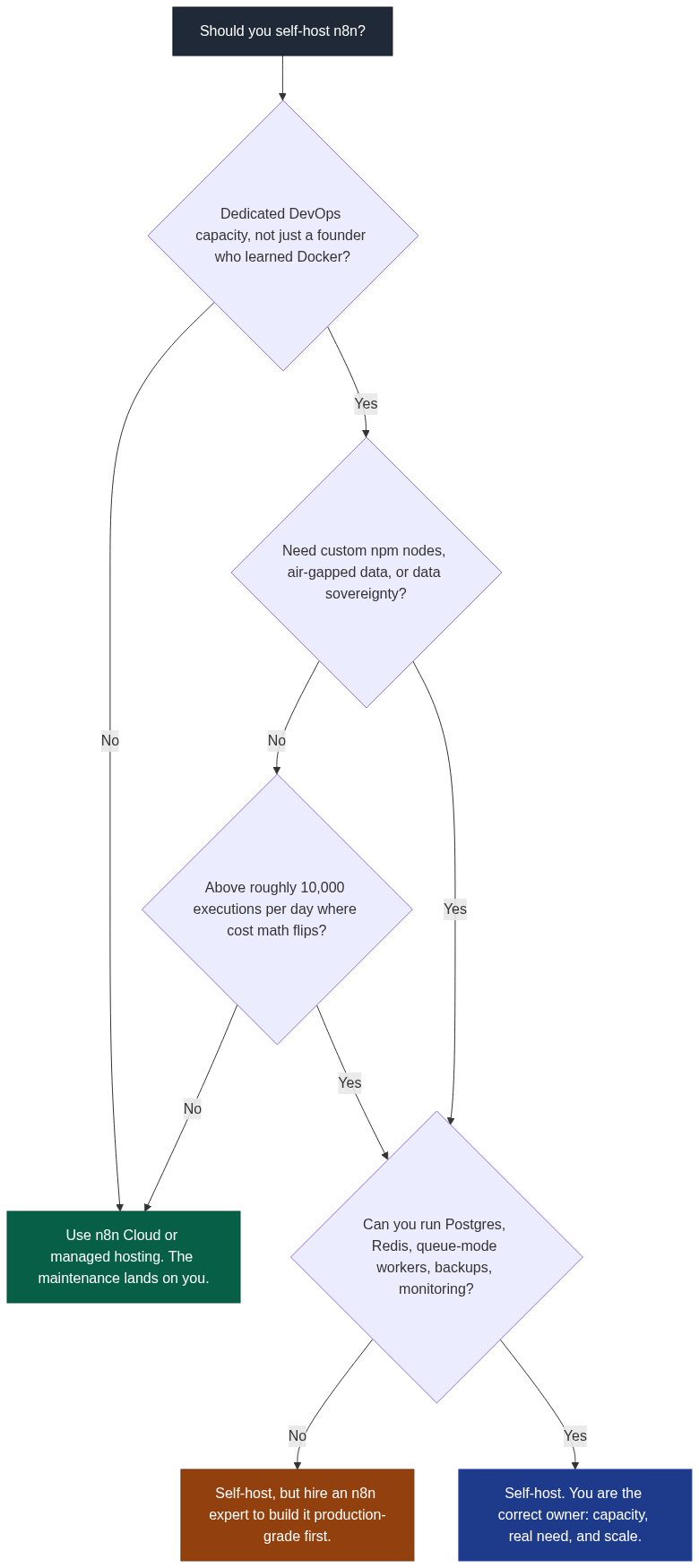
The three outcomes map cleanly. No DevOps capacity and no hard customization need: use managed. A real need but no capacity to run it production-grade: self-host, but bring in help to build it right the first time, which is cheaper than rebuilding after an incident. See what to look for in an n8n expert and what to expect to pay. Capacity plus a real need plus scale: self-host with confidence.
FAQ
Is n8n Cloud worth it compared to self-hosting?
For most non-technical teams, yes. It removes servers, updates, backups, and monitoring entirely; you pay more per month and buy back time. For technical teams it depends on whether you have real maintenance bandwidth, a customization need cloud cannot meet, or the scale where self-hosting economics flip.
What is the single most dangerous part of self-hosting n8n?
The encryption key. N8N_ENCRYPTION_KEY encrypts every credential in your database. Lose it, or restore a backup with a different key, and every credential becomes undecryptable. Document it in a secure place and back it up alongside the database and the data directory.
Can I migrate from self-hosted to managed later?
Yes. Workflow exports are straightforward; the real work is credential migration and reconnecting integrations, because credentials are encrypted and do not transfer cleanly. Plan for re-authenting your integrations rather than expecting a clean lift-and-shift.
How do I know my self-hosted setup is in trouble?
Watch for rising execution failures, memory climbing as workflow count grows (usually a Code node duplicating large payloads), backup jobs timing out, or the honest admission that you have not updated in months because you are afraid something will break. Any one of these means it needs attention.
At what execution volume do I need queue mode?
Community guidance puts standard single-instance n8n with Postgres as fine below about 1,000 executions per day, queue mode with one worker in the 1,000 to 10,000 range, and multiple workers plus dedicated webhook processors above 10,000. Queue mode requires both PostgreSQL and Redis; SQLite is not supported.
Does self-hosting really only need 2 GB of RAM?
That is the official testing minimum, not a production spec. A single Code node handling a large JSON response can consume hundreds of MB, and a few such workflows in parallel exhaust 2 GB fast. Production realistically wants around 4 vCPU and 8 GB RAM with NVMe storage and PostgreSQL.
If you have read this far, you are probably already feeling the maintenance load. n8n Logic helps technical founders get self-hosted setups production-grade, or move to infrastructure that does not need their constant attention. Talk to n8n Logic about which side of the flowchart you are on.
