
TL;DR: A stock n8n container is built to get you running, not to survive a business. Out of the box the public REST API is enabled, SSRF protection is off, credentials in the Code node can read your environment variables, and every payload your workflows touch is retained for 336 hours. The nine controls below close that gap: custody of N8N_ENCRYPTION_KEY, N8N_SECURE_COOKIE, enforced 2FA, N8N_PUBLIC_API_DISABLED, webhook auth, project scoping for credentials, execution-data pruning as a PII control, N8N_PROXY_HOPS, and a real patch cadence. The full hardened docker-compose.yml is at the end.
What does hardening a self-hosted n8n actually mean?
It means changing nine defaults. n8n's defaults optimise for a developer getting a workflow running in five minutes, and several of them are actively wrong for a business instance holding customer data and live API credentials. Hardening is not a firewall exercise. It is a list of environment variables plus a credential-custody decision.
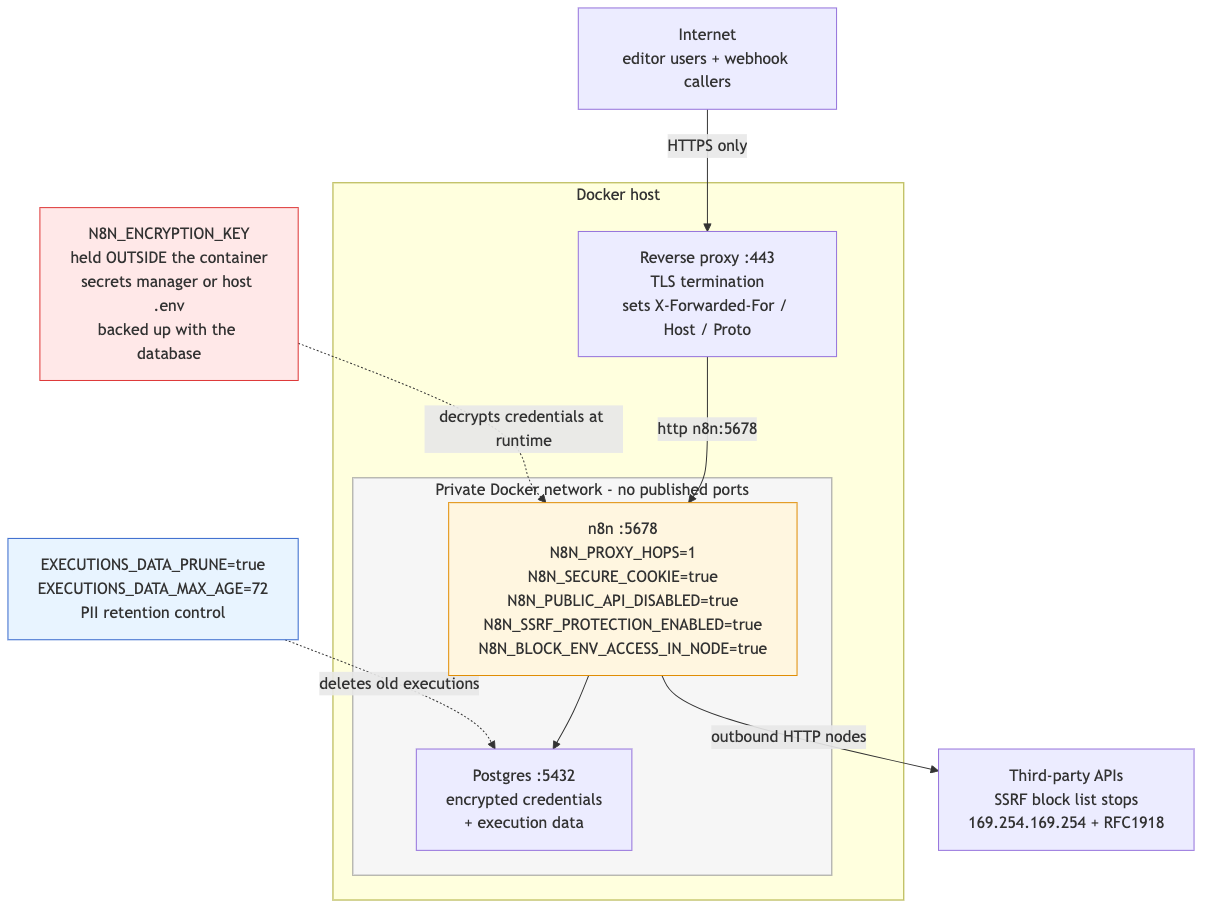
Everything below is checked against n8n's own documentation. Defaults change between versions and variables get renamed, so treat any n8n config guide older than a few months as suspect, including this one after a while.
What happens if you lose N8N_ENCRYPTION_KEY?
Every credential in your database becomes permanently unreadable. n8n generates a random encryption key on first launch and saves it in the ~/.n8n folder, then uses that key to encrypt credentials before they are written to the database. The database ciphertext and the key live in two different places. Lose one, keep the other, and you have nothing.
This is the single most common way people destroy a self-hosted n8n. The failure mode is boring: n8n runs in a container, the key was auto-generated into the container's filesystem rather than a mounted volume, the container is recreated on a redeploy, and now the fresh instance has a new key and a database full of credentials it cannot decrypt. Nobody notices until a workflow fires.
Three rules:
-
Set the key explicitly, never let n8n generate it.
N8N_ENCRYPTION_KEYis a plain environment variable. Generate a long random string, store it in a secrets manager or a host-level.envfile that is not in git, and inject it. -
Back it up with the database, not near it. A database backup without the matching key is a useless file. Whatever runbook covers your Postgres dump must cover the key.
-
In queue mode, every worker needs the same value. The n8n docs are explicit about this: if you run workers, the encryption key environment variable must be specified on all of them. See queue mode with Redis workers for how that fits together.
Rotating the key
n8n has a two-layer key model behind the flag N8N_ENV_FEAT_ENCRYPTION_KEY_ROTATION (default false). N8N_ENCRYPTION_KEY becomes a master key that never changes and only protects a separate data encryption key, and that inner key is the one you rotate from Settings > Data Encryption Keys.
Read the warning before you touch it: enabling it is a one-way migration. n8n starts writing credentials in a new format that older versions and instances without the flag cannot read. Turning the flag back off makes everything written since permanently inaccessible, and there is no conversion tool. The only rollback is a database backup taken before you enabled it. Take that backup, test on staging, then enable on production.
Which login settings do you actually need to change?
Three. Leave N8N_SECURE_COOKIE at its default of true, tighten N8N_SAMESITE_COOKIE from lax to strict, and force two-factor authentication on every account. The 2FA switch is the one people get wrong, because setting the obvious variable on its own does nothing.
N8N_SECURE_COOKIE defaults to true and ensures cookies are only sent over HTTPS. It shows up in this article because of how often people turn it off. If you are trying to reach n8n at http://your-server-ip:5678 and the login will not stick, every forum answer tells you to set N8N_SECURE_COOKIE=false. That is not a fix, it is a downgrade: your session cookie now travels in plaintext. Put a reverse proxy with TLS in front instead.
For 2FA, n8n supports authenticator apps and issues recovery codes at enrolment. N8N_MFA_ENABLED defaults to true, which only means users are allowed to enable 2FA. To require it, you need two variables, and this is the non-obvious part:
N8N_SECURITY_POLICY_MANAGED_BY_ENV=true
N8N_MFA_ENFORCED_ENABLED=true
N8N_MFA_ENFORCED_ENABLED (default false) has no effect at all unless N8N_SECURITY_POLICY_MANAGED_BY_ENV is true. That group switch is the activation pattern n8n uses for env-managed settings: the area's variables are inert until the _MANAGED_BY_ENV flag turns the group on, at which point n8n applies them on every startup and locks the matching UI controls. Available from n8n v2.18.0. Set one without the other and you will believe 2FA is enforced when it is not.
While you are in there, N8N_USER_MANAGEMENT_JWT_DURATION_HOURS defaults to 168. A stolen session token is good for a week. Twenty-four hours is a more defensible number for an instance that holds production credentials.
Should you disable the n8n public API?
Yes, unless you call it. N8N_PUBLIC_API_DISABLED defaults to false, which means the public REST API is exposed on every fresh instance whether you use it or not. n8n's own documentation recommends disabling it to improve the security of your installation. Set it, and disable the Swagger playground alongside it.
N8N_PUBLIC_API_DISABLED=true
N8N_PUBLIC_API_SWAGGERUI_DISABLED=true
This is not theoretical attack-surface reduction. Of the security advisories n8n published in mid-2026, several were authorization flaws in exactly this surface, including a public API execution-retry authorization bypass (GHSA-h3jj-5f3v-3685) and a privilege-escalation path through public API key scope assignment (GHSA-777w-rpr6-c52h). An endpoint you have disabled cannot have an authorization bug.
If you do need the API, at least change N8N_PUBLIC_API_ENDPOINT off its default of api and keep the Swagger UI off.
How do you authenticate an n8n webhook?
The Webhook node supports Basic auth, Header auth, and JWT auth. The default is None, which means the URL is the only secret. That is acceptable for the random path n8n generates and unacceptable the moment someone edits the path to something readable like /webhook/new-lead.
Pick by caller. Header auth for internal services and scripts, since it is a shared secret in a header and nothing more. JWT auth when the caller can sign a token and you want expiry. Basic auth only when the calling system supports nothing else.
Providers that sign requests with an HMAC of the body, which is most of the serious ones, will not fit any of the three. For those, leave the node auth as None and verify the signature yourself in the first node of the workflow, then reject anything that does not match before the payload touches the rest of the workflow. The webhook node reference covers the mechanics.
One instance-wide gotcha: webhook paths are unique across the entire n8n instance, across all users and workflows. If two workflows claim the same path, the first one published wins and the other errors. This is why hand-editing paths to something guessable is doubly bad.
Can you stop one user's credential from becoming everyone's credential?
Only partly, and you should know exactly where the line is. n8n scopes credentials with projects: a credential lives inside a project, and project membership is the boundary. Within a project there are three roles, Admin, Editor, and Viewer, and their permissions are worth reading closely before you trust them.
| Permission | Admin | Editor | Viewer |
|---|---|---|---|
| View credentials in the project | yes | yes | yes |
| Edit credentials and workflows | yes | yes | no |
| Execute workflows | yes | yes | no |
| Manage members | yes | no | no |
The Project Editor role requires a Pro Cloud or self-hosted Enterprise licence, and the Project Viewer role requires Enterprise. On a Community instance you do not get graduated roles, which means the practical unit of isolation is the instance, not the project. If two teams must not see each other's credentials and you are not licensed for RBAC, run two instances.
Even with RBAC, note what the table says: an Editor can build a workflow that uses any credential in the project. n8n does not display the decrypted secret in the UI, but a workflow author who can attach a credential to an HTTP Request node can send it wherever they like. Credential scoping limits who can reach a secret, not what they can do with it once they can.
Two settings help on the margins. N8N_PERSONAL_SPACE_SHARING_ENABLED (default true) lets users share resources out of their personal space; set it to false so credentials cannot leak sideways out of the project structure. And run the built-in audit, which reports credentials not used by any workflow. Delete those. A credential nobody uses is a credential nobody notices being used.
How long does n8n keep execution data?
Fourteen days, by default, and this is your largest GDPR exposure. EXECUTIONS_DATA_PRUNE defaults to true and EXECUTIONS_DATA_MAX_AGE defaults to 336 hours. Every payload that passes through a workflow, including the personal data inside it, is written to Postgres and sits there for two weeks. Pruning is on, but the window is generous.
n8n says this directly: if you self-host, you are responsible for deleting user data, and n8n recommends configuring pruning every few days to avoid effortful GDPR request handling. The variable it names is EXECUTIONS_DATA_MAX_AGE. Treat that as a compliance control, not a disk-space setting.
The full set:
| Variable | Default | What to consider |
|---|---|---|
EXECUTIONS_DATA_PRUNE | true | Leave on. Never set to false on an instance touching personal data. |
EXECUTIONS_DATA_MAX_AGE | 336 (hours) | Drop to 72. Three days is enough to debug and short enough to defend. |
EXECUTIONS_DATA_PRUNE_MAX_COUNT | 10000 | A hard ceiling on rows regardless of age. 0 means no limit. |
EXECUTIONS_DATA_SAVE_ON_SUCCESS | all | Set none if successful runs carry PII you have no reason to keep. |
EXECUTIONS_DATA_SAVE_ON_ERROR | all | Keep all. Failures are the ones you need to look at. |
EXECUTIONS_DATA_SAVE_MANUAL_EXECUTIONS | true | Manual test runs against production data are stored too. |
Deletion is two-stage, which surprises people who go looking in the database: n8n soft-deletes on an interval (EXECUTIONS_DATA_PRUNE_SOFT_DELETE_INTERVAL, default 60 minutes) and hard-deletes on a shorter one (EXECUTIONS_DATA_PRUNE_HARD_DELETE_INTERVAL, default 15 minutes), with a buffer (EXECUTIONS_DATA_HARD_DELETE_BUFFER, default 1 hour) that keeps recent executions around while you are still building. So a row you expect to be gone may still be there for a bit. Budget for that when you answer a deletion request.
What do you set when n8n runs behind a reverse proxy?
Four variables, and one of them is a trust decision. n8n builds its public URLs from N8N_PROTOCOL, N8N_HOST and N8N_PORT, which is wrong the moment a proxy terminates TLS on 443 and forwards to n8n on 5678. n8n's fix is to set the URL manually and tell n8n how many proxies to trust.
WEBHOOK_URL=https://n8n.example.com/
N8N_EDITOR_BASE_URL=https://n8n.example.com/
N8N_PROXY_HOPS=1
N8N_PROXY_HOPS defaults to 0 and is the number of reverse proxies n8n is running behind. It is the trusted-proxy setting: it determines how many X-Forwarded-For entries n8n believes. Set it too high and a client can spoof its own source IP by injecting an extra header, which poisons anything downstream that reads the client address. Count your actual proxies. One nginx or Caddy in front means 1. Cloudflare plus nginx means 2.
The last proxy on the path must forward X-Forwarded-For, X-Forwarded-Host and X-Forwarded-Proto. Get one of those wrong and n8n hands out http:// webhook URLs on an HTTPS site. The exact nginx block is in the reverse proxy config, including the websocket header pair that most guides omit.
And do not publish port 5678. In Docker Compose that means simply omitting ports: from the n8n service and putting the proxy on the same network. If n8n is reachable directly on :5678, none of your proxy-layer controls exist.
Turn on SSRF protection. It ships off.
N8N_SSRF_PROTECTION_ENABLED defaults to false. Turning it on is probably the highest-value single flag in this article, because n8n is a machine for building HTTP requests out of untrusted input, which is the exact shape of an SSRF vulnerability.
With protection on and N8N_SSRF_BLOCKED_IP_RANGES set to default, n8n blocks outbound requests to RFC 1918 private ranges (10.0.0.0/8, 172.16.0.0/12, 192.168.0.0/16), loopback, IPv6 unique-local, reserved ranges, and link-local 169.254.0.0/16. That last one is the cloud metadata endpoint at 169.254.169.254, which is how an attacker turns "your workflow fetched a URL I chose" into "your workflow handed me your instance's IAM role."
If a workflow legitimately needs to reach an internal host, allow that one target rather than turning protection off:
N8N_SSRF_PROTECTION_ENABLED=true
N8N_SSRF_ALLOWED_IP_RANGES=10.20.0.5/32
Allow-lists are checked first and always override the block list. Note that N8N_SSRF_BLOCKED_HOSTNAMES is not a security control, and n8n says so: it denies by name, so a caller reaches the same host through an IP literal. Use the IP block list for actual protection.
Shrink what a workflow author can reach
Four more variables, all about blast radius rather than perimeter. If someone compromises an account or a workflow author makes a bad decision, these decide how far it goes.
N8N_BLOCK_ENV_ACCESS_IN_NODE defaults to false, which means expressions and the Code node can read the process environment. That environment is where N8N_ENCRYPTION_KEY and your database password live. Set it to true.
NODES_EXCLUDE already excludes n8n-nodes-base.executeCommand and n8n-nodes-base.localFileTrigger by default. Add n8n-nodes-base.ssh unless someone needs it. Note that overriding NODES_EXCLUDE replaces the default list rather than adding to it, so restate the two defaults when you extend it.
NODE_FUNCTION_ALLOW_BUILTIN and NODE_FUNCTION_ALLOW_EXTERNAL control module imports in the Code node and are disabled by default. Leave them empty. If a workflow needs a library, that is an argument for a custom node, not for opening require to everyone.
N8N_COMMUNITY_PACKAGES_ENABLED defaults to true. A community node is arbitrary npm code running with your instance's privileges and credentials. On a business instance, set it to false, or at minimum set N8N_UNVERIFIED_PACKAGES_ENABLED=false.
How fast does n8n ship security patches, and how fast should you apply them?
In batches, and fast. On 16 June 2026 n8n published 19 advisories in a single day, including a cross-tenant credential takeover (CVE-2026-54305, high), credential exfiltration via a permission bypass (CVE-2026-54307, high), and a Python sandbox escape (CVE-2026-49444, high). Another ten landed on 8 July 2026, including an authenticated remote code execution via a legacy expression evaluator sanitizer bypass and a stored DOM XSS. Both batches were coordinated disclosures with patches available on the day.
The patched versions from the June batch tell you how n8n maintains releases: fixes landed simultaneously in 1.123.55 on the 1.x maintenance line and in 2.25.7 and 2.26.2 on the 2.x line. The current release at the time of writing is 2.29.10 (10 July 2026). If you are on 1.x, you are still getting security fixes, but you are one line away from the one that gets attention.
A workable cadence for a business instance:
- Pin an exact version tag in your compose file, never
latest. You cannot reason about what you are running otherwise, andlatestwill silently move you across a major version. - Watch
github.com/n8n-io/n8n/security/advisories. GitHub will email you. This is the only feed that matters; release notes will not flag severity. - Patch High-severity advisories within days, not sprints. The June batch included bugs that cross the credential boundary directly. If your instance holds client API keys, a credential-exfiltration bug is a breach-notification event, not a maintenance ticket.
- Keep
N8N_VERSION_NOTIFICATIONS_ENABLEDat its defaulttrue, which surfaces new versions and security updates in the UI.
Then verify with the tool n8n ships for exactly this. Run n8n audit (or POST to /audit, or use the n8n node with Resource > Audit) and read the Instance report: it flags unprotected webhooks, missing security settings, and whether your instance is outdated. Run it after every change in this article.
The hardened docker-compose.yml
Every variable here is one of the ones cited above. Replace the domain, generate real secrets, and put your reverse proxy on the n8n_net network.
services:
  postgres:
    image: postgres:16-alpine
    restart: unless-stopped
    environment:
      POSTGRES_USER: n8n
      POSTGRES_PASSWORD: ${POSTGRES_PASSWORD}
      POSTGRES_DB: n8n
    volumes:
      - postgres_data:/var/lib/postgresql/data
    networks:
      - n8n_net
    healthcheck:
      test: ["CMD-SHELL", "pg_isready -U n8n -d n8n"]
      interval: 10s
      timeout: 5s
      retries: 5

  n8n:
    # Pin an exact tag. Never :latest.
    image: docker.n8n.io/n8nio/n8n:2.29.10
    restart: unless-stopped
    depends_on:
      postgres:
        condition: service_healthy
    # No `ports:` on purpose. Only the reverse proxy on n8n_net reaches :5678.
    environment:
      # 1. Credential encryption. Lose this and every credential is unreadable.
      #    Generate once: openssl rand -base64 32
      N8N_ENCRYPTION_KEY: ${N8N_ENCRYPTION_KEY}

      # 2. Public URL + trusted proxy. N8N_PROXY_HOPS = your real proxy count.
      N8N_HOST: n8n.example.com
      N8N_PORT: 5678
      N8N_PROTOCOL: https
      N8N_EDITOR_BASE_URL: https://n8n.example.com/
      WEBHOOK_URL: https://n8n.example.com/
      N8N_PROXY_HOPS: 1

      # 3. Session security. Both of these are defaults worth keeping/tightening.
      N8N_SECURE_COOKIE: true
      N8N_SAMESITE_COOKIE: strict
      N8N_USER_MANAGEMENT_JWT_DURATION_HOURS: 24

      # 4. Enforced 2FA. MFA_ENFORCED does nothing without the group switch.
      N8N_SECURITY_POLICY_MANAGED_BY_ENV: true
      N8N_MFA_ENFORCED_ENABLED: true
      N8N_PERSONAL_SPACE_SHARING_ENABLED: false
      N8N_PERSONAL_SPACE_PUBLISHING_ENABLED: false

      # 5. Public REST API. On by default. Turn it off if you do not call it.
      N8N_PUBLIC_API_DISABLED: true
      N8N_PUBLIC_API_SWAGGERUI_DISABLED: true

      # 6. SSRF. Off by default. This is the flag to flip.
      N8N_SSRF_PROTECTION_ENABLED: true
      N8N_SSRF_BLOCKED_IP_RANGES: default

      # 7. Blast radius. Keep the Code node away from your secrets.
      N8N_BLOCK_ENV_ACCESS_IN_NODE: true
      N8N_BLOCK_FILE_ACCESS_TO_N8N_FILES: true
      N8N_RESTRICT_FILE_ACCESS_TO: /data/files
      NODES_EXCLUDE: '["n8n-nodes-base.executeCommand","n8n-nodes-base.localFileTrigger","n8n-nodes-base.ssh"]'
      N8N_COMMUNITY_PACKAGES_ENABLED: false

      # 8. Execution data is PII. 72h instead of the 336h default.
      EXECUTIONS_DATA_PRUNE: true
      EXECUTIONS_DATA_MAX_AGE: 72
      EXECUTIONS_DATA_PRUNE_MAX_COUNT: 5000
      # Kept as `all` on purpose. Pruning above already bounds how long this
      # data lives, and `none` would silently destroy your audit trail of
      # successful runs - see "When not to apply this" below before changing it.
      EXECUTIONS_DATA_SAVE_ON_SUCCESS: all
      EXECUTIONS_DATA_SAVE_ON_ERROR: all
      EXECUTIONS_DATA_SAVE_MANUAL_EXECUTIONS: false

      # 9. Tell me when a patch lands.
      N8N_VERSION_NOTIFICATIONS_ENABLED: true

      # Database
      DB_TYPE: postgresdb
      DB_POSTGRESDB_HOST: postgres
      DB_POSTGRESDB_PORT: 5432
      DB_POSTGRESDB_DATABASE: n8n
      DB_POSTGRESDB_USER: n8n
      DB_POSTGRESDB_PASSWORD: ${POSTGRES_PASSWORD}

      GENERIC_TIMEZONE: Europe/Tallinn
    volumes:
      - n8n_data:/home/node/.n8n
      - ./files:/data/files
    networks:
      - n8n_net

volumes:
  postgres_data:
  n8n_data:

networks:
  n8n_net:
    driver: bridge
The companion .env holds exactly two lines, and neither goes in git:
POSTGRES_PASSWORD=<openssl rand -base64 32>
N8N_ENCRYPTION_KEY=<openssl rand -base64 32>
If you want the wider context on what each variable does outside a security frame, the full environment variable reference covers the rest.
When not to apply this
Two of these will break working workflows, and one is a decision the file deliberately does not make for you.
N8N_SSRF_PROTECTION_ENABLED=true blocks outbound requests to private ranges. If your workflows call an internal API, a database admin panel, or a service on the same VPC, they will start failing. Allow the specific target with N8N_SSRF_ALLOWED_IP_RANGES rather than turning protection off.
N8N_BLOCK_ENV_ACCESS_IN_NODE=true breaks any expression or Code node that reads $env. Some people pass config into workflows this way. Move those values to n8n variables or a credential first.
EXECUTIONS_DATA_SAVE_ON_SUCCESS is the one to think about. The file above ships all, because pruning already bounds how long the data lives and because none silently deletes your audit trail of successful runs: if you later need to prove to a client that an invoice went out on a given date, that record is gone and nothing warns you. Set none only when successful runs carry personal data you have no reason to keep, and only once the proof you actually need is written to a system you control. Do not make both choices by accident.
And if none of this sounds like something you want to own, that is a legitimate answer. The tradeoff is laid out in n8n Cloud vs self-hosted.
FAQ
Can I change N8N_ENCRYPTION_KEY after credentials already exist?
Not by editing the variable. n8n will fail to decrypt the existing credentials because they were encrypted with the old key. If you need rotation, use the N8N_ENV_FEAT_ENCRYPTION_KEY_ROTATION feature, which rotates a separate data encryption key while the master key stays fixed. Back up the database before enabling it, because it is a one-way migration.
Is the n8n Community Edition secure enough for client data? It can be, with the settings above, but it has no graduated RBAC. Project Editor and Viewer roles require a Pro Cloud or Enterprise licence. On Community, anyone with access to a project can use every credential in it, so the boundary between two clients has to be two instances rather than two projects.
Do I still need webhook authentication if the URL is a random string? The random path is meaningful protection, but it is a bearer secret that will end up in logs, proxies, and browser history. Add Header auth on anything that triggers a real action. Add it always if someone has replaced the generated path with a readable one.
Why did my execution data not disappear after the retention window?
Deletion is two-stage. n8n soft-deletes on a 60-minute interval and hard-deletes on a 15-minute one, with a one-hour buffer that keeps recent executions available while you are building. A row past EXECUTIONS_DATA_MAX_AGE can survive for over an hour before it is actually gone.
Does disabling the public API break the n8n UI?
No. The editor uses the internal REST endpoint (N8N_ENDPOINT_REST, default rest), not the public API. N8N_PUBLIC_API_DISABLED=true only affects programmatic access at /api.
How do I check whether my instance is actually hardened?
Run n8n audit. Its Instance report flags unprotected webhooks, missing security settings, and whether your version is outdated, and the Credentials report lists credentials no workflow uses. It is the fastest honest answer to "did that config actually apply."
Need this done properly?
If you are running n8n for a business and would rather not discover the encryption-key problem during a restore, n8n Logic deploys and maintains hardened self-hosted n8n instances. That includes the key custody runbook, the proxy layer, execution-data retention set to what your DPA actually says, and a patch process that does not depend on someone noticing a GitHub email.
